
Every domain.
A clear home.
Add domains, check ownership records, and create mailboxes with explicit access. Account-wide storage and recipient limits remain visible.
Understand domain setupA WORKSPACE FOR YOUR DOMAINS
A private browser workspace for your domains, saved conversations, and website integrations. Start with clear permissions and visible limits, then verify each step toward live email.
Private browser workspace pilot.
Public email hosting is not yet open.
Private transactional sending is active. Public receiving remains disabled.
Illustrative preview · fictional addresses · no live mail
BUILT AROUND YOUR WORK
For owners preparing their domains and developers planning transactional website email. The Cloudflare pilot keeps access, saved messages, and integration limits in one private workspace.
Add domains, check ownership records, and create mailboxes with explicit access. Account-wide storage and recipient limits remain visible.
Understand domain setupCompose plain-text drafts, reply, organize folders, download attachments, and search message details. Read and send access require an explicit mailbox grant.
See the interfaceIssue mailbox-scoped API keys and set daily recipient limits. Scheduling, cancellation, and recorded job states support the sending workflow once provider activation is complete.
Explore website sendingThe Cloudflare pilot has a smaller feature set than the preserved local application. Transactional sending is active for approved apps. Receiving, full migration, and mail-client connections have separate acceptance gates.
A CLOSER LOOK
A familiar inbox and a considered control center. This screenshot shows the broader preserved local application; the Cloudflare pilot provides the smaller feature set described below.
Actual local application screenshot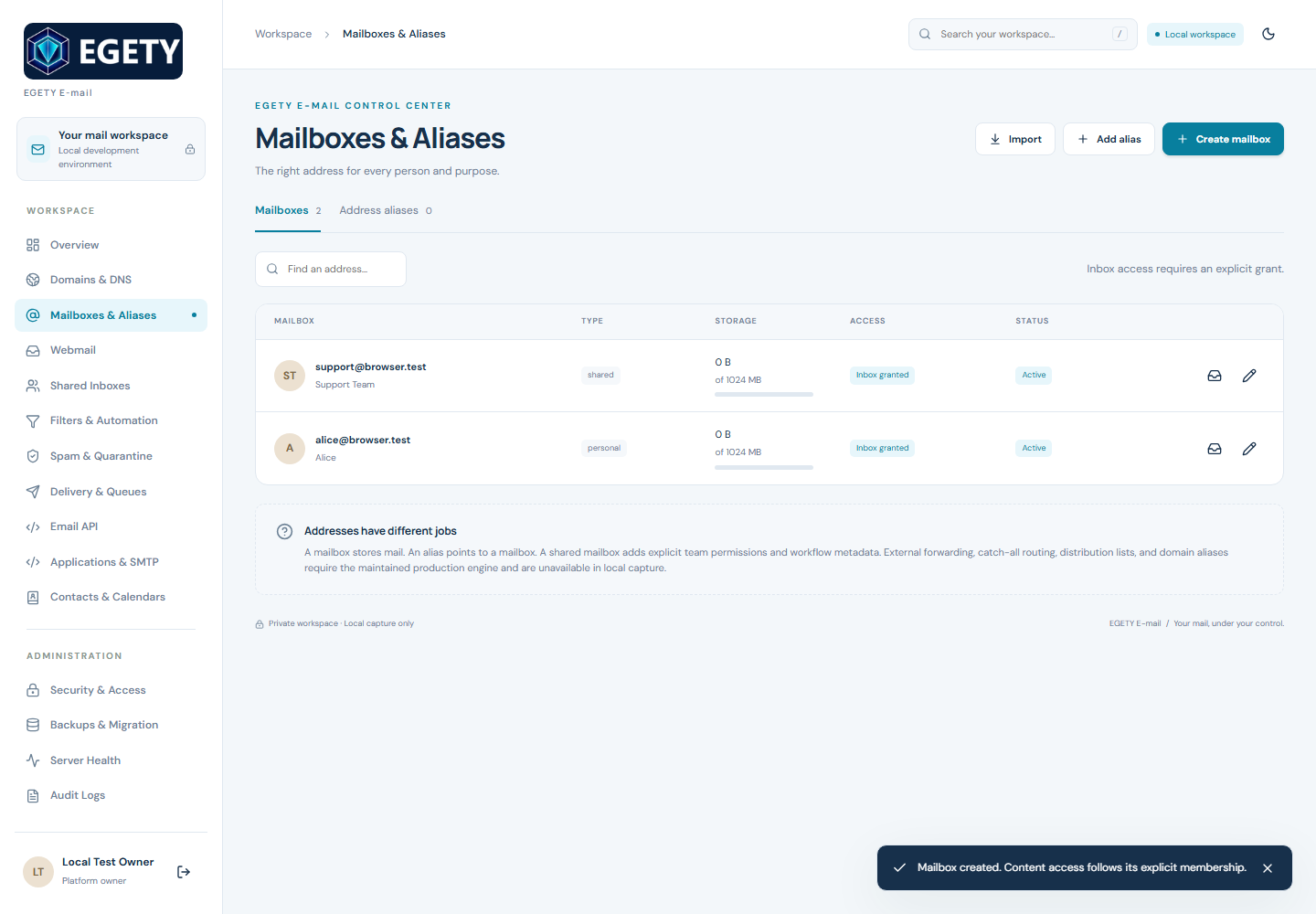
Inbox, Sent, Drafts, Archive, Spam, and Trash. Read flags, starring, and message-detail search organize saved conversations. A Spam folder does not imply a spam scanner.
Explicit grants define who may read, change, or send from a mailbox. Administration alone never grants access to its contents.
Queued work, provider acceptance, failures, and uncertain outcomes stay distinct. Neither a Sent copy nor provider acceptance confirms inbox delivery.
A DELIBERATE START
Your existing mail deserves a careful transition. The setup path makes each dependency visible before a live change.
Identify the domains, mailboxes, aliases, and websites that already send email. Preserve the current provider and records.
Publish the exact ownership TXT shown by the pilot. Provider onboarding separately supplies sending-domain records such as DKIM and SPF.
Create private mailboxes and grant your account inbox and sending access explicitly. Keep application keys scoped and review account limits.
Verify transport, durable receiving, backup recovery, and the clients you need before changing live MX or moving historical mail.
A domain connection is not a mail migration. Live receiving, historical import, and external delivery remain separate acceptance steps.
View readinessFOR THE WEBSITES YOU BUILD
Send transactional website notifications using a key scoped to an approved mailbox. Machine requests also need a Cloudflare Access service credential. The private pilot has passed a controlled recipient-side delivery check.
POST /api/v1/emails
CF-Access-Client-Id: $CF_ACCESS_CLIENT_ID
CF-Access-Client-Secret: $CF_ACCESS_CLIENT_SECRET
Authorization: Bearer $EGETY_API_KEY
Idempotency-Key: [saved request ID]

{
  "mailboxId": "your-granted-mailbox-id",
  "to": ["recipient@example.com"],
  "subject": "A little update",
  "text": "Your message starts here."
}Server-side example for the active private pilot. Keep credentials in private server environment variables. The bound mailbox determines the sender. A queued request is not delivery proof.
ACCESS, WITH BOUNDARIES
Security is a set of controls you can inspect. The private pilot combines Cloudflare Access with application sign-in and explicit mailbox permissions. Local checks do not replace deployment review.
Website data & privacyPassword hashing, HTTP-only sessions, CSRF checks, sign-in throttling, and optional authenticator-based two-factor authentication.
Mailbox reading and sending require explicit grants. Application keys are scoped, revocable, and shown only when created.
The Cloudflare pilot displays message text without rendering email HTML or remote images. Attachment downloads require authorization.
KNOW WHAT YOU'RE CONNECTING
Webmail, API sending, and full mailbox hosting are different capabilities. Here is where the current implementation stands.
| Capability | Current status | What to expect |
|---|---|---|
| Browser workspace | Private pilot | Explicitly granted mailboxes, plain-text messages, folders, drafts, replies, attachments, settings, MFA, and owner API keys. No public signup. |
| Website sending API | Private pilot active | Active for approved apps and sender domains, behind Access and scoped mailbox keys. A controlled delivery was verified; individual message delivery is not guaranteed. |
| Public incoming mail | Production pending | Production receiving is disabled. Live routing, external inbound acceptance, and durable recovery must be verified before any migration. |
| Outlook, Apple Mail & other clients | Not yet supported | Production IMAP, POP3, and authenticated TLS SMTP submission are not currently available. |
| Message size & storage | Explicit limits | Cloudflare pilot: up to 20 attachments, 3 MiB combined decoded attachments, and 5 MiB encoded MIME. Defaults: three mailboxes, 25 recipients/day, 500/month, and 100 MiB retained/reserved storage. Native sending permits one envelope recipient. |
| Migration & recovery | Separate checks | Encrypted point-in-time mail backup and an isolated restore have been verified for a controlled checkpoint. Historical-provider migration and production recovery cutover remain separate checks. Preserve the existing provider. |
Usage limits are not a hard cap on the Cloudflare bill. No unlimited usage, public signup, payment plan, or guaranteed inbox placement is offered. Spam and malware scanning require a connected service.
A FEW USEFUL ANSWERS
Practical questions deserve straightforward answers.
The private pilot displays an ownership TXT record for your domain. Provider onboarding separately supplies sending records such as DKIM and SPF. Adding a mailbox does not enable receiving or replace your current provider.
Adding a domain in the workspace does not change live DNS. Any MX change must follow a separate migration plan, capacity check, backup, and tested rollback. Keep your current provider until the receiving and sending checks pass.
The pilot provides scoped server-side keys, usage limits, scheduling, cancellation, and recorded job states. Requests require a Cloudflare Access service credential as well as the EGETY key. Transactional sending is active for approved apps and sender domains. Each new sender requires ownership proof and provider onboarding.
The private pilot offers browser webmail. IMAP, POP3, and mailbox SMTP login are not available, so Outlook and Apple Mail cannot connect as mail clients. Keep an existing client setup until the required protocols are supported and tested.
Historical migration requires access to the source provider, capacity planning, a supported import path, and reconciliation of folders, timestamps, flags, and attachments. An MX switch does not import old messages. No historical migration is implied by this website.
The owner completes one-time setup and explicitly grants mailbox access. Optional authenticator MFA protects sign-in. The pilot has no self-service password/MFA recovery or recovery codes; operator recovery material is essential. User/grant administration has API routes but no management screen. An isolated restore of a mail-containing checkpoint has passed; production recovery cutover and historical migration remain separate checks.
Start with the setup planner below. Its current mode is displayed before you provide information. When protected intake is enabled, a confirmed submission goes to the project owner for review; it does not create an account. Otherwise, you can save a local brief. Public self-service signup is not open.
START WITH A CLEAR PLAN
Tell the planner what you need. Review your setup brief, understand the dependencies, and keep the next move deliberate.
Nothing is submitted. Your entries stay in this page until you copy or download the brief. No account is created.
Do not include passwords, API keys, private messages, or mailbox exports.